 Spenti
Turn Malaysian bank alerts into expenses on iPhone, with one Shortcuts automation
An iPhone can turn your bank's notifications and SMS into expenses in Spenti by itself, with one Shortcuts automation. The text is read on the phone and never sent anywhere. It works with MAE by Maybank2u, CIMB OCTO, Touch 'n Go eWallet and Malaysian bank SMS: no screenshot, no typing, and about two minutes to set up. This guide shows every tap.
- What you need: an iPhone on iOS 27 or later for bank app notifications, or iOS 17 or later for bank SMS; Spenti installed; a bank whose alerts carry the amount.
- What you build: one automation in the Shortcuts app with a trigger (your bank's notification or SMS) and one action, Spenti's Add expense from message.
- What happens: each alert is read on the phone, saved as an expense, and never sent anywhere. Each saved message counts as one scan; ignored ones are free.
How it works
An iPhone app cannot read other apps' notifications. Shortcuts can. You build an automation that starts when your bank app sends a notification (iOS 27 or later) or when your bank sends an SMS (iOS 17 or later), and it hands the text to Spenti's action, Add expense from message. Spenti reads the amount, the shop and the time on the phone with its own rules, saves the expense, and tells you with a short notification of its own.
The automation runs even when Spenti is closed. Refunds lower your spending, money in is saved but never counts as spending, and TAC codes, balance notices and promotions are ignored. There is no bank login and no account: Spenti only ever sees the text of the alert.
Which Malaysian banks work?
Any bank or e-wallet whose alert carries the amount. For Malaysia, Spenti uses general rules checked against real alerts, in English and in Malay (pembayaran, dibayar, diterima, pindahan, DuitNow). This is what has been checked against real alerts so far.
| Bank / e-wallet | What Spenti reads today |
|---|---|
| Maybank (MAE by Maybank2u) | MAE notifications for Scan & Pay, card spends, DuitNow and money received; older "RM0.00 MBB: …" SMS. Most card alerts now come through the app, not SMS. |
| CIMB (CIMB OCTO MY) | SMS and notifications: card charges, DuitNow, third-party transfers, FPX, money credited. |
| Public Bank (MyPB) | "Thank you for using your card …" SMS and DuitNow received. |
| Touch 'n Go eWallet, Ryt Bank | DuitNow transfer and money-received notifications. A Cash In top-up is not saved, since it only moves your own money. |
| RHB, AmBank, BSN, Bank Islam, Bank Rakyat, HSBC Amanah, Standard Chartered | General rules, checked against only a few real alerts. TAC codes and Malay notices are ignored, as they should be. |
| Hong Leong (HLB Connect), GXBank | No real alert checked yet. It may well work; if not, send one in (see below). |
Two things are specific to Malaysia. First, the RM0 or RM0.00 at the start of every commercial SMS is the message charge, not an amount, and Spenti drops it. Second, banks have moved alerts into their apps: Maybank stopped sending SMS for debit card transactions in December 2020, and Secure2u approvals now live only in MAE. If your bank still sends SMS alerts, check in its app that transaction alerts are on and the alert threshold is as low as it goes. Never point the automation at a chat app such as WhatsApp: every chat message would be handed to Spenti.
This guide is also written for other markets' banks: Global (English), Malaysia (Bahasa Melayu), Philippines (English), Singapore (简体中文), Myanmar (မြန်မာဘာသာ), Spain (Español), France (Français), Germany (Deutsch).
Set it up for bank app notifications (iOS 27)
Use this if your bank app sends a notification for each payment, like MAE or Touch 'n Go eWallet. On iOS 27 an automation lives inside the shortcut itself, as a trigger block at the top. The screenshots below are from an iPhone in English.
- Open Shortcuts, start a new shortcut and add the trigger When I receive a notification. Choose your bank's app; tap + to add more than one.
- Below it, add Spenti's action. Search for Add expense and pick Add expense from message. The action keeps its English name on every iPhone, whatever language the phone is set to.
- Tap the Message field. If it says Shortcut Input, delete it.
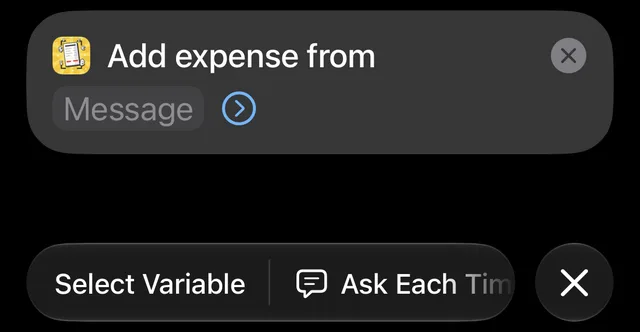
- Above the keyboard, swipe the variable bar until you see Notification, and tap it.
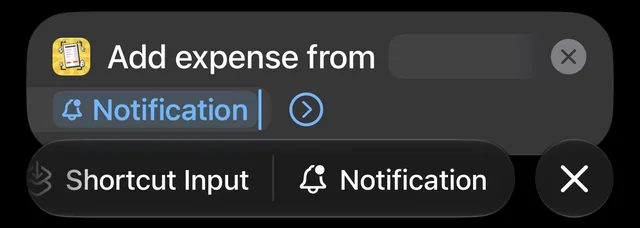
- Tap the Notification token you just added, and under Get choose Body. That is the text of the alert, with the amount in it.
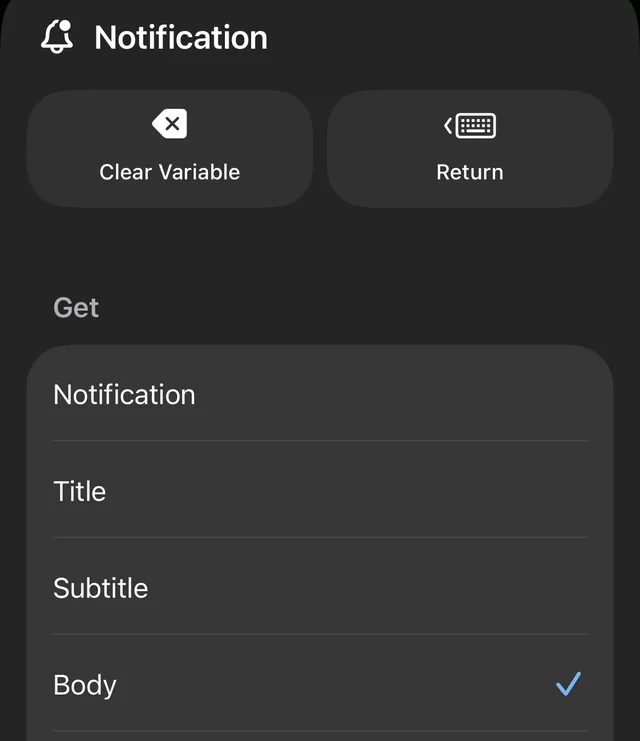
- Tap the arrow on Spenti's action to show From. Fill it the same way, but choose Title. MAE puts the kind of transaction in the title, such as "Maybank2u: Scan & Pay", and Spenti uses it. Keep just the one Title token there.
- Tap the arrow on the trigger block and make sure Automation is switched on. Notify can stay off.
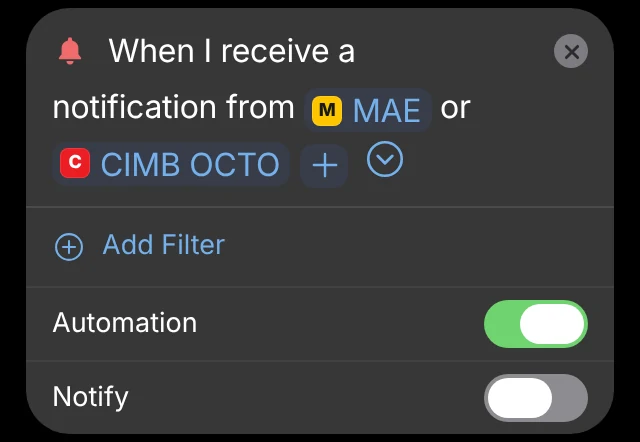
- Tap Done. Your bank's next alert saves by itself.
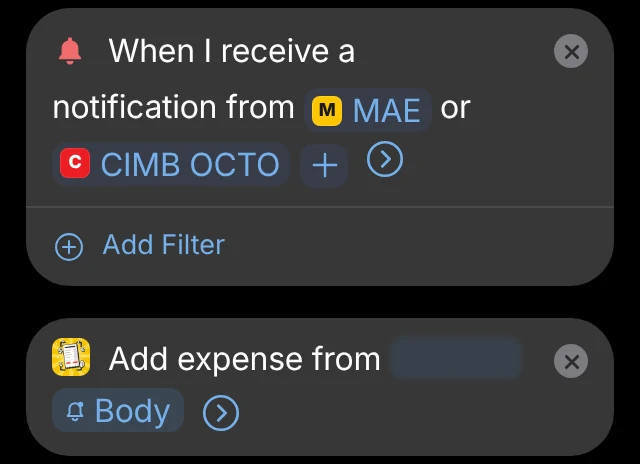
The one mistake to avoid: in a shortcut started by a trigger, Shortcut Input is empty. If the Spenti action reads Shortcut Input, Spenti reports an empty message. Always feed it the trigger's own variable, Notification › Body here, as in steps 4 and 5.
Set it up for bank SMS
On iOS 27
The same as above with a different trigger. Add When I receive a message, tap Add Filter and set Sender is to your bank's sender name exactly as Messages shows it. Add Add expense from message, clear the Message field, tap Message in the variable bar, tap the token and under Get choose Content. Then switch the trigger's Automation on and tap Done.
On iOS 17 to 26
- In Shortcuts, open the Automation tab, tap + and choose Message.
- Set Sender to your bank, choose Run Immediately, and tap Next.
- Choose New Blank Automation and add Add expense from message.
- Set Message to Shortcut Input › Content, and tap Done.
Bank app notifications are not available as a trigger before iOS 27, so on these versions use your bank's SMS. Some banks send from more than one sender name; add each one.
Check that it works
Make a small payment, or wait for the next one. Spenti posts a short notification saying what it saved, if you allow Spenti's notifications, and the expense pins to the corkboard in your room. In Spenti's settings, the Bank messages page shows whether messages are arriving and what happened to the last few.
Nothing arrived? Check these, in order:
- Spenti says the message was empty. The action is reading Shortcut Input. Redo steps 3 to 5.
- Nothing happens at all. Make sure the trigger's Automation switch is on, and that the bank app is allowed to send notifications in iPhone Settings. Some banks only alert above a threshold you set in their app, so lower it to the minimum.
- Spenti says "Not an expense, ignored" for a real payment. Some bank apps send a bare "You have a new transaction" without the amount. Look in the bank app's own settings for a full-detail alert, or use the bank's SMS instead.
- Your bank's alert is not read right yet. On the Bank messages page, tap the message and use Copy details for support to send it in. Real alerts are how new rules get added.
Pay with Apple Pay too? A second automation, built from Spenti's Add Wallet payment action, files each tap in Wallet the same way. Spenti's Bank messages page has a step-by-step picture guide for every version above. Spenti is live on iPhone; Android is next, and there it will read the bank apps' notifications itself, with no Shortcuts step.
Weighing up other apps first? Read our Malaysia expense apps compared, or start from Spenti for Malaysia.
Frequently asked questions
Can I auto track expenses from Malaysian bank alerts on iPhone?
Yes. iPhone apps cannot read other apps’ notifications, but the Shortcuts app can. A personal automation that starts on your bank app’s notification (iOS 27 or later) or bank SMS (iOS 17 or later) hands the text to Spenti’s action, Add expense from message, and Spenti saves the expense on the phone, even while it is closed.
Does it read MAE and CIMB OCTO notifications?
Yes, on iOS 27. Spenti reads MAE notifications such as “Successful payment of RM 94.00 to …” and CIMB alerts that carry the amount. Maybank now sends many card alerts through the app instead of SMS, so for Maybank the app-notification route is the main one.
What about the RM0 at the start of bank SMS?
It is the charge for the message, not the transaction. Spenti drops the RM0 or RM0.00 prefix before reading, so “RM0 CIMB: FPX Payment RM48.00” is saved as RM48.00.
Are TAC codes and Secure2u messages saved?
No. TAC and one-time codes, Secure2u approval requests, card holds, balance notices and promotions are ignored, and ignored messages do not count as scans.
Does it work with DuitNow?
Yes. A DuitNow transfer or DuitNow QR payment that names the amount is saved as a transfer or a payment, with the payee when the alert names one. Money you receive by DuitNow is saved as money in and never counts as spending.
Does my bank message leave the phone?
No. Shortcuts hands the text to Spenti on the same phone, and Spenti reads it there with its own rules. It is never sent anywhere, not even when Your own AI is turned on for receipts and chat.
Does it cost anything?
The feature is on every plan. Each message Spenti saves counts as one scan from your monthly allowance, like a scanned receipt: 30 a month on Free, 100 on Basic, unlimited on Pro. Duplicates and ignored messages are free. When a month is used up, new payments wait and are saved next month or as soon as you upgrade.
How do I stop it, and does it work on Android?
To stop, open the shortcut in Shortcuts, tap the arrow on the trigger block and switch Automation off, or delete the shortcut. Spenti is on iPhone today; Android is next, and there Spenti will read bank app notifications itself once you grant notification access, with no Shortcuts step.