0 Spenti servers
Private first. Not private later.
Scanning and chat run on your phone by default. No Spenti account, no bank login, nothing sent to us: there is no server of ours to send it to.
 Spenti
 private AI for your money




Saved! $6.45Logged! $25Logged! $9.80Saved! $29.90
6 rooms, or make your own
snap!
Receipt photos and payment screenshots land where they always do: in your photos. Nothing to upload, nowhere to sign in.
on the phone
Pick them from your photos. Our own AI, fine-tuned on thousands of real receipts, lifts the merchant, amount, date and items. The photo never leaves your phone.
kept!
Each in its own currency, any of 31. Anything it is unsure of waits for you to check.
ding!
Tap Apple Pay or get a bank alert and an Apple Shortcuts automation hands it to Spenti. Saved on the phone before it is back in your pocket.
no server
No Spenti account, no bank login, no Spenti server. By default nothing leaves this phone; backup and Your own AI are yours to switch on.
why Spenti is different
0 Spenti servers
Scanning and chat run on your phone by default. No Spenti account, no bank login, nothing sent to us: there is no server of ours to send it to.
270M parameters, fine-tuned by us
Not a generic model behind an API. Small models we fine-tuned on 10,000+ real receipts and conversations, the crumpled and faded ones too, so a new layout does not throw them.
4 GB of memory is enough
On-device AI usually means a new flagship. Spenti is quantized and tuned until the whole pipeline fits in 4 GB: it works best on iPhone 12 or newer, and older phones work, more slowly. iPhone and iPad, iOS 16 or later.
Your own AI on Pro, off by default
Connect your own ChatGPT, Gemini, Claude or OpenRouter account, or your own server: anything OpenAI-compatible, like vLLM, LM Studio or Ollama on your computer. It reads the text of each receipt and answers chat, in any language, straight from your phone, never through Spenti. Photos and bank messages never leave the phone. Switch back to On this phone any time. How Your own AI works.
The receipt reader (about 230 MB) downloads on your first scan. Spending chat on this phone is an optional download of about 850 MB. After that, scanning and chat work offline unless you choose your own AI. Speed depends on the phone; older ones take a little longer per receipt.
how it works
Choose saved receipts and payment screenshots from your photos. Start with a small batch, then import more.
Check the amount, date, merchant or recipient, and category. Correct any mistakes before relying on the records.
"My top three expenses this year?" Answered from your own data, on your own phone, or by your own AI if you turn it on.
What to expect, honestly
Bank transfers, QR payments and wallet receipts — PromptPay, PayNow, GCash, QRIS, DuitNow, PayPay, KBZPay and others. Check the amount, date and recipient after scanning.
Restaurant bills, convenience-store and supermarket receipts. Faded text and unusual layouts can need correction. Review the extracted fields against the original.
privacy, the whole point
Receipts are read and questions answered on your phone, and nothing goes to Spenti: there is no Spenti server for your data. Turn on Your own AI (Pro) and the text goes to the provider you chose, never to us. The Privacy Policy covers backups and network use.
In On-this-phone mode, the default, turn on airplane mode after the model download and try scanning a receipt or asking a spending question. With Your own AI on, each scan is one request to your provider. The privacy policy explains when the app uses the network.
Scanning and spending chat do not require a Spenti account or bank login. If you enable cloud backup, you use your own iCloud or Google Drive account.
Your data choices
PROCESSING: never Spenti
NO SPENTI ACCOUNT · NO SPENTI SERVER · NO TRACKERS
not a spreadsheet
No grey tables. Spenti is a room you live in. Tap the scenery and the toys to see them move; light, dark or by the clock.



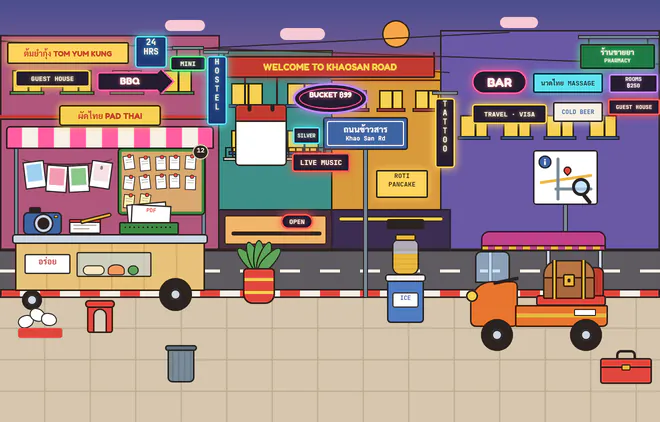


The Boy's and Girl's rooms and Brother are free on every plan, and so is any scene your own AI paints for you. Pro opens four more built-in rooms and the whole family of six.
make your own level
A moonlit beach, a campsite, your grandma’s kitchen: any place, real or made up. Four steps, a few minutes, with the AI you already use. Spenti never calls an AI itself.
Free on every planType it in a few words, or tap one of sixty ideas. Then pick a look: anime painting, watercolour, pixel art and more.
Paste it into ChatGPT, Gemini or any AI that makes pictures. It paints your place with Spenti’s furniture in it, and lists where each piece stands.
Save the picture, pick it in Spenti and paste the list. Spenti finds every piece; anything the AI missed, it draws in.
The corkboard holds your receipts, the calendar shows your week, the jar shows what is left. Name it, and send it to a friend if you like.

auto-log
Set up one Apple Shortcuts automation and every Apple Pay tap and bank notification lands in Spenti by itself. No typing, no snapping. Each message is read on the phone and never sent anywhere, even with Your own AI on.
Bank messages are tuned for Thai banks and wallets, with English-language alerts from US, UK and European banks and general rules for Malaysia and the Philippines. Refunds lower your spending; money in never counts as spending. Each payment filed counts as a scan.
Apple Pay: Starbucks · $6.45
Your bank: Debit 4.85 USD 25/10/2026 at 17:42
Spenti: Logged. Both.
you pay → Shortcuts hands it over → Spenti saves it
speaks your language
Every screen of the app, in your language: Spenti follows your phone's. Each receipt keeps its own currency, whichever language you read it in.
Burmese comes with its own font and is offered on first run in Myanmar, because iPhones can't be set to Burmese. Chinese is one Simplified edition for every Chinese phone. Spending chat on the phone reads English and Thai, and offers suggested questions in all twelve, answered in yours; with Your own AI (Pro) it answers anything in any language. Tap a language for the page written for that country.
the full kit
pricing
$0 no account, no card
Start tracking for free. Everything happens on your phone.
$1.99 per month
$1.99/month or $14.99/year
Export and backup to your own cloud, with monthly limits for everyday use.
$4.99 per month
$4.99/month or $29.99/year. Or $79.99 one-time.
No limits at all, every room, the whole family of six, and your own AI if you choose.
US prices. The App Store shows the price in your currency before you buy. Free never expires and needs no card. Purchase Basic or Pro inside the app. Monthly and yearly subscriptions can be cancelled any time. Redeem a promo code in Settings. If Pro ends, Spenti moves back to the boy's room and shows Brother; your picks are remembered.
why build this
Spenti is an independent app. Support mail gets a real reply, the roadmap is public, and what ships next is decided by the people using it.
faq
The receipt reader (about 230 MB) downloads on your first scan. Spending chat on this phone is an optional download of about 850 MB. After that, scanning and chat work offline unless you choose your own AI.
Paper receipts and payment screenshots from the places Spenti is built for: Thailand (PromptPay and Thai banks), Japan, South Korea, Singapore, Myanmar, Indonesia, the Philippines, Malaysia, Spain, France and Germany. Pick your country at the bottom of the page for the details that apply to you.
The app speaks English, Thai, Simplified Chinese, Korean, Japanese, Burmese, Indonesian, Filipino, Malay, German, French and Spanish. Spending chat on the phone reads English and Thai, and offers suggested questions in all twelve languages, answered in yours; with Your own AI (Pro) it answers anything in any language. Each receipt keeps its own currency, one of 31: baht, yen, won, Singapore dollars, kyat, rupiah, pesos, ringgit, US dollars, euros and more. Receipts in Burmese, Chinese, Japanese, Korean, Khmer, Lao, Hindi, Arabic, Hebrew and Cyrillic scripts are read on the phone too.
Your receipts and spending records are stored in a local database on your phone. Optional backup on Basic or Pro copies your data to your own iCloud or Google Drive account. Your phone's operating-system backup settings may also include app data. Spenti does not receive those backups.
Not unless you choose to. By default, receipt recognition and spending chat run on your phone and nothing is sent to any AI provider; after the model download both work offline. On Pro you can connect your own AI (ChatGPT, Gemini, Claude or OpenRouter); then only the text of a receipt and your chat questions go to that provider, under your own account, and never to Spenti. Photos and bank messages never go. How Your own AI works.
A Pro option, off by default. Instead of the models on your phone, your own ChatGPT, Gemini, Claude or OpenRouter account reads the text of each receipt and answers your spending questions, in any language. It can also be a server you run yourself: any OpenAI-compatible one, such as vLLM, LM Studio or Ollama on your own computer; enter its address and model ID. You connect it in Settings and can switch back to On this phone any time. Spenti never sees your key or your receipts; your provider bills you under its own pricing.
Yes, on the phone. On iPhone, a Shortcuts automation hands each message to Spenti (bank SMS on iOS 17 or later, bank-app alerts on iOS 27 or later), and another files each Apple Pay payment; Android is coming. The message is read on the device and never sent anywhere, even with Your own AI on. Tuned for Thai banks and wallets, it also reads English-language alerts from US, UK and European banks, with general rules for Malaysia and the Philippines. Refunds lower your spending and money in never counts as spending. Each one filed counts as a scan; duplicates and ignored messages are free.
Without a usable backup, you may lose the records stored on that phone. Basic and Pro offer optional backup to your own iCloud or Google Drive. Check that a recent backup is available before changing phones; you will need access to the same cloud account and any backup passphrase you set.
Not yet. Spenti is live on iPhone (iOS 16 or later); Android is next. There's no date to promise, so the honest answer is: follow the roadmap.
Processing time depends on your phone, image quality, batch size, heat and power settings. Let the model download finish, then try a small batch first. Large imports can take longer as the phone warms up. Keep the app open during scanning. If scanning repeatedly stalls, contact support with your device and app version.
Results vary with the layout and image quality. Review the amount, date, merchant or recipient, and category, and correct any mistakes before relying on your spending totals.
Yes, as money in. Bank alerts and Apple Pay payments that bring money in are saved too: a refund, reversal or cashback becomes a Refund that lowers your spending when Spenti finds the purchase it refunds, and anything else becomes Money in, which never counts as spending. Any entry can be switched between Spent, Refund and Money in when you edit it, and the analysis and recap show In · Out · Left. Scanned receipts and screenshots stay expenses unless you switch them. Spenti does not track account balances.
Free to start — no card, no account · Live on iOS, Android soon
Download on the App Store